
APA Format Styles Are a Snap with Reference Point Software
With just a few clicks of the mouse, your document will have the proper margins, with the header and page numbers at exactly the right place for any APA format style paper. Even references and citations are a breeze. Simply type in the information, and the software will format it perfectly; that’s APA help you can use!
To learn more scroll down to see the list of features or:
- Watch a demo video
- Click to view a Windows slideshow
- Click to view a MAC slideshow
- Watch our video tutorials
- Read what our customers have to say
You need to use APA format templates that allow you to concentrate on the content of your paper so that you can learn about the topic rather than word processing commands and our software does just that. Save time and work smarter with our Reference Point Software. Our templates are available in APA style for use with Microsoft Word, Microsoft Office 365, OpenOffice, LibreOffice and NeoOffice on any version of Windows or OS X.
These templates are based on the 7th Edition of the APA Publication Manual and include support for APA format style guidelines for electronic resources and references.
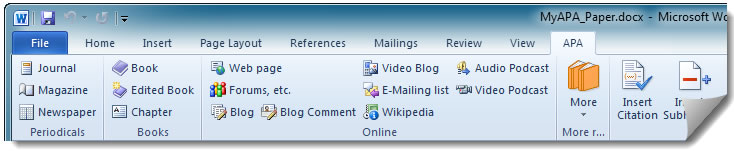
Get the APA style points you deserve with Reference Point Software templates. Order now!
What Does the APA version of our Format Template Do?
- Sets up a new document in APA 7th edition format, within which you can start typing your paper
- Automatically formats the reference list and makes inserting citations a breeze
- Easily reuse references in multiple documents with the built-in database
- Creates the header with page numbers and running head
- Sets up the proper margins, line spacing, and other key details
- Creates a title page
- Creates an abstract page, a place for the body of the paper, and reference page
- Easily adds properly formatted headings and subheadings
- Formats each reference with commas, parentheses, italics, and indents in exactly the right spots
- Makes it seamless to cite a reference in the body of the paper, even when citing multiple sources at once
- Creates complex page numbering (MS Word only)
- Provides sample tables that you can modify for your own needs (MS Word for Windows only)
- Provides an APA format template to create an outline (MS Word only) easily
- With Reference Point templates, your citation info travels with your document. If you work on more than one computer, you only need to copy one file to the other computer ΓÇô your APA document!
- You have complete control over where the reference database is stored. This makes it easy to sync multiple computers with Dropbox or other file-syncing services.
- Quickly and efficiently backs up your document automatically and on-demand (MS Word for Windows only)
- Compatible with Win XP, Vista, Win 7, Win 8, and OS X (see order page for specifics)
Need an APA Format Template? We support both Windows & Mac
If you have any questions about APA Format Styles or our software, Reference Point Software is here to help you. Contact us here.
Learn more about the different versions of our templates


